For office teams

Know every kit.
Run every case.

Kitlogi gives the office a live read on every scheduled case: which kits are assigned, what’s expiring, what a rep just flagged, and what still needs a decision. Built for medical device reps and office teams who want simple, reliable kit visibility.

Scan the UDI. Track the kit. Stay ready.
Kitlogi office dashboard
The office dashboard

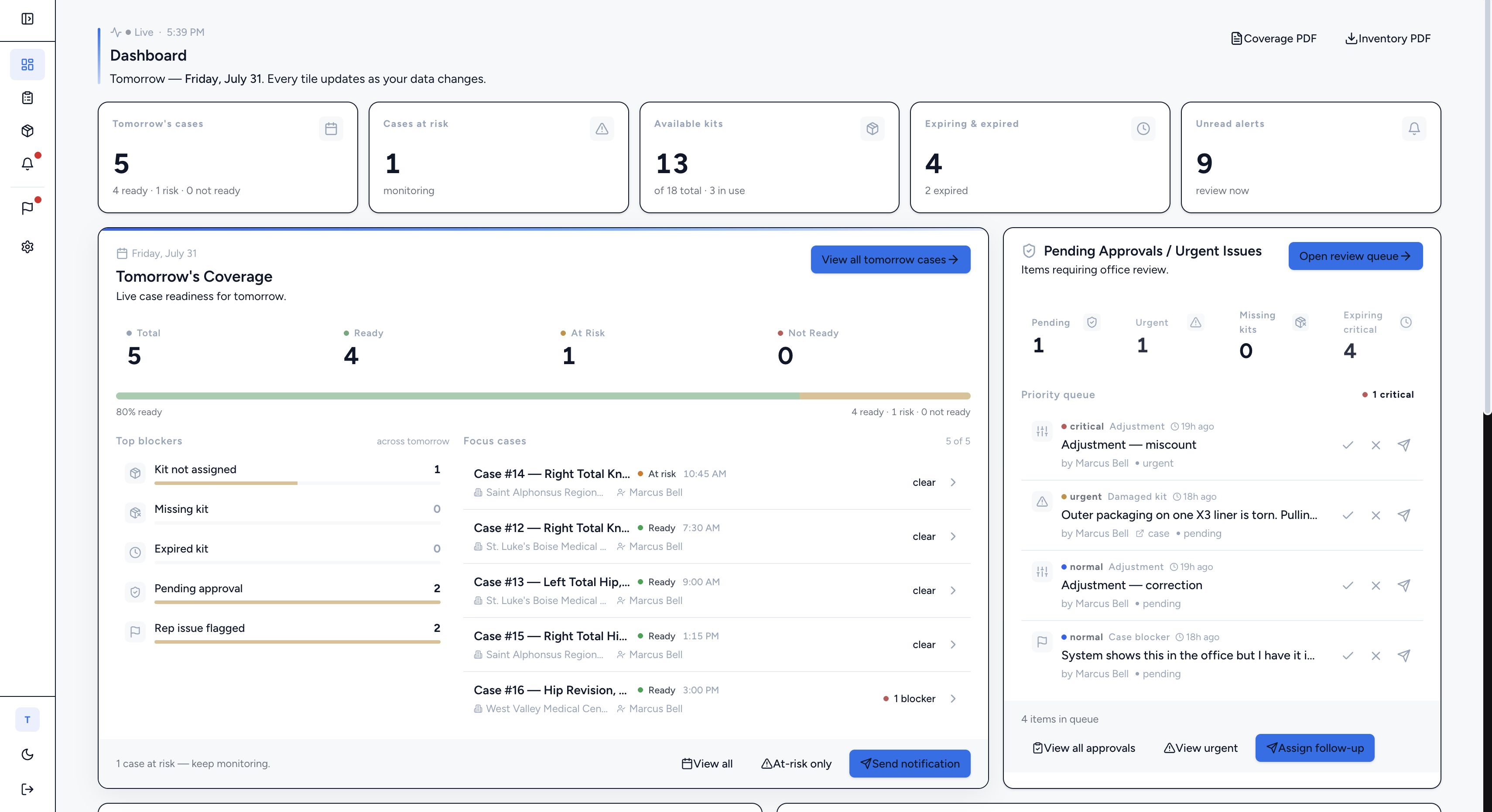
Tomorrow's cases, ready or not, before you walk in

The dashboard opens on tomorrow. Five tiles across the top read the whole operation at a glance: tomorrow's cases, cases at risk, available kits, expiring and expired, and unread alerts. Underneath, a live coverage bar shows exactly how ready you are for the next day and which cases still have blockers.

  • Tomorrow’s coverage as a single ready percentage with per-case status
  • Top blockers ranked: kit not assigned, missing kit, expired kit, pending approval, rep issue flagged
  • Focus cases list you can clear one by one as they turn ready
  • Every tile updates the instant a rep scans, flags, or a kit changes state
Kitlogi office dashboard showing tomorrow's coverage
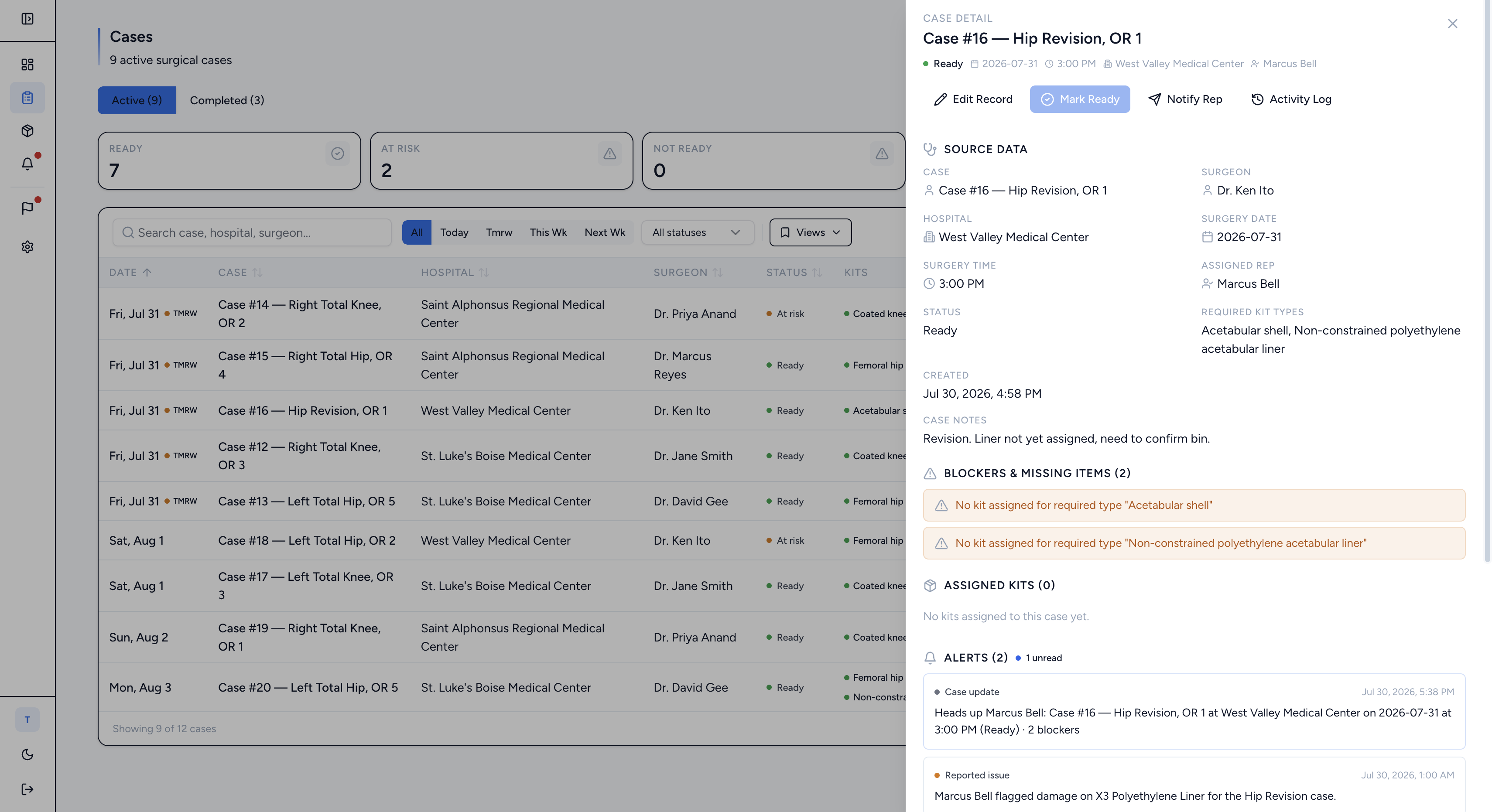
Case detail drawer with kit coverage, alerts, and notes
Cases

Every surgical case, sorted by the day it happens

The cases view lists active and completed cases with date, hospital, surgeon, status, and the exact kits each one needs. Filter by today, tomorrow, this week, or next week. Open any case to see assigned kits, the alerts attached to it, its full activity log, and a running note thread with the rep.

  • Ready / at‑risk / not‑ready status on every case, driven by real kit coverage
  • Missing‑kit warnings when a required type has nothing assigned
  • Mark ready, edit the record, notify the rep, or open the activity log in one click
  • Case notes threaded with the rep so context never lives in a text message
Kits & UDI inventory

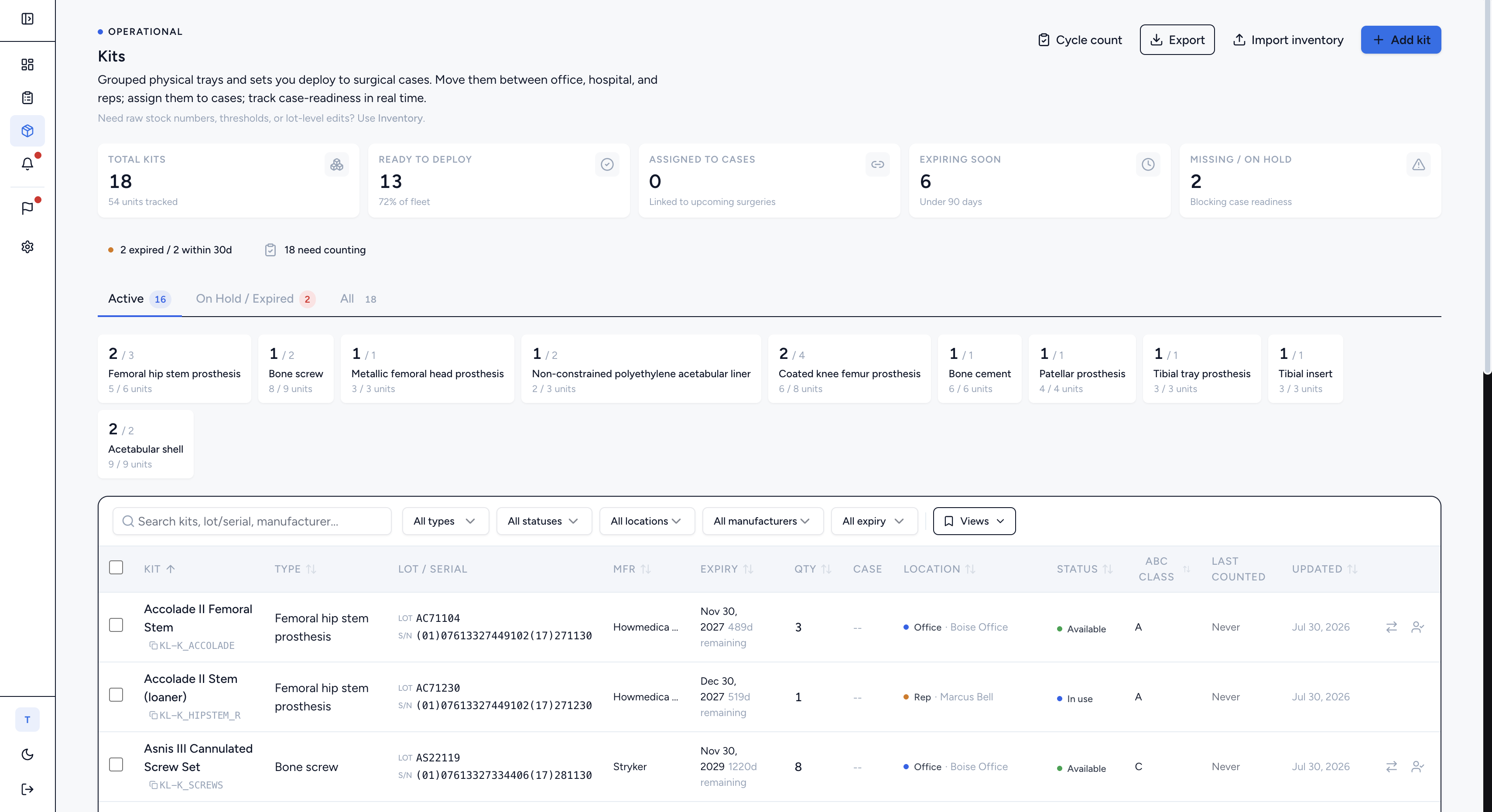
Real UDI, lot, serial, and ABC class on every kit

Inventory is grouped by kit type and backed by the codes that actually matter in the field. Each kit carries its UDI, lot and serial numbers, manufacturer, expiration date, and ABC class. Scan a QR or barcode, or search, and the exact kit comes up with its full history and the cases it is tied to.

  • UDI, lot, and serial captured per kit, not just a name
  • Grouped by type with available / in‑use / missing counts
  • Kit detail shows activity, notes, and every related case
  • Quick search by name, type, or scanned code
Kits inventory grouped by type with UDI, lot, serial, and ABC class
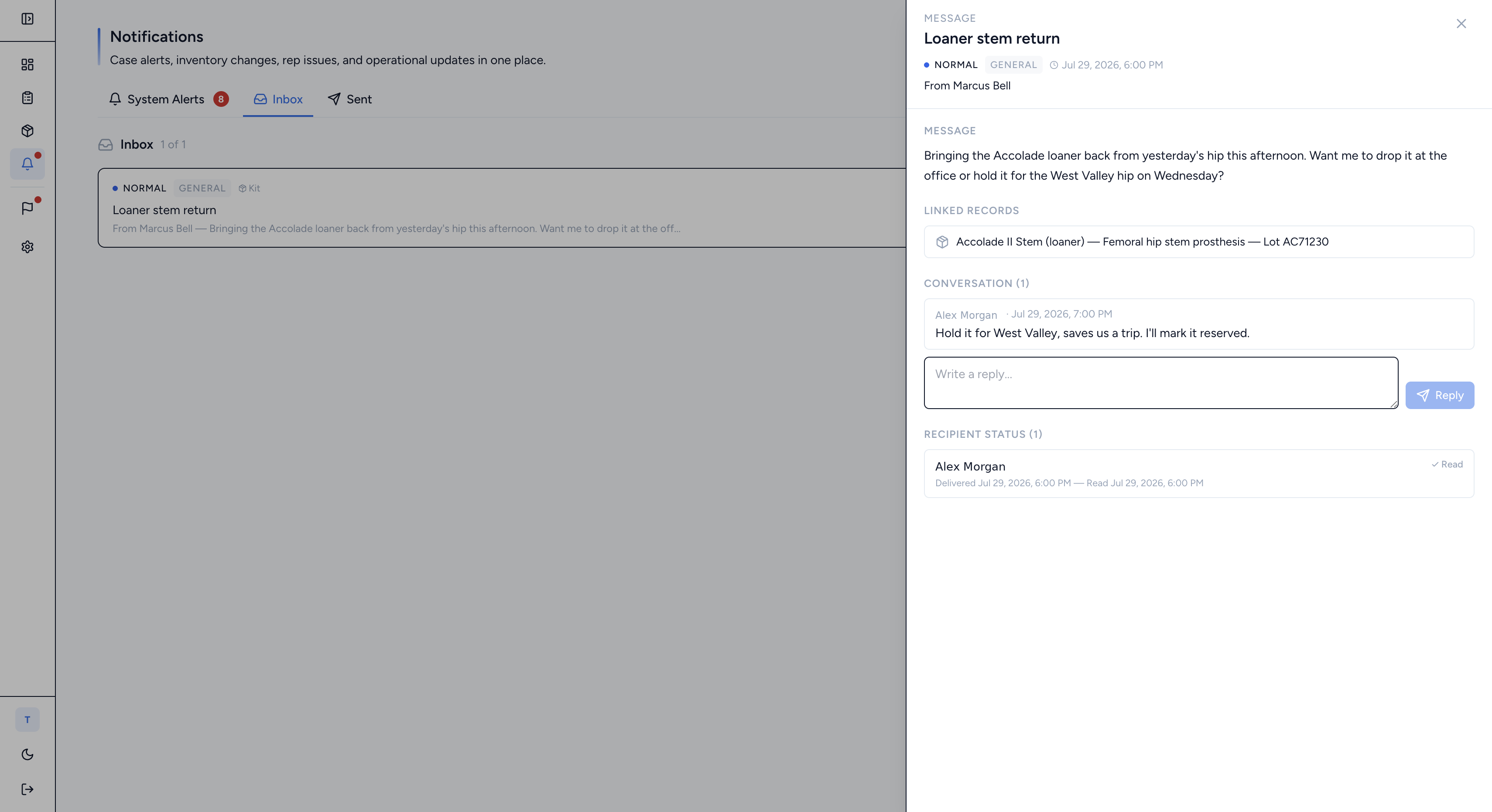
Notifications inbox with a threaded message and read status
Notifications & inbox

Problems surface days ahead, not the morning of

System alerts and messages roll into one place. Expiring kits, rep‑flagged damage, and case updates arrive as alerts you can open, read, and clear. The inbox holds threaded conversations tied to a kit or case, with read status so you know the rep actually saw it.

  • Expiration warnings well ahead of the case date
  • Rep flags arrive with the kit and case already attached
  • Alerts roll up so the feed never turns into noise
  • Message threads show delivery and read status per recipient
Approvals

Requests move through a queue, decisions stick to the case

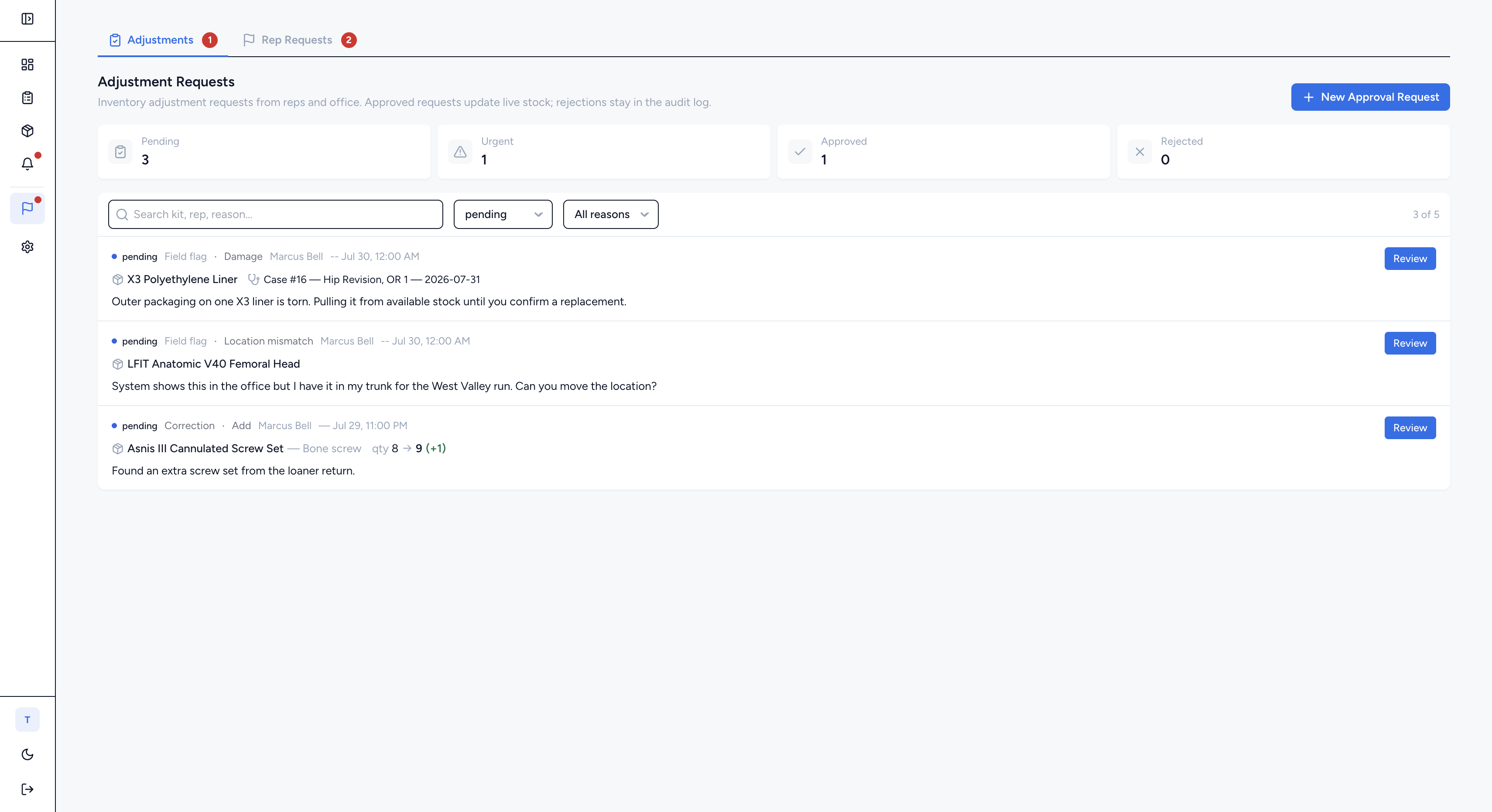
When a rep needs a count corrected or flags a hold, it becomes a tracked request, not a lost text. The approvals queue separates adjustment requests from rep requests, ranks the urgent ones, and lets you approve, reject, or ask for more information. Every decision is logged against the case.

  • Adjustment requests and rep requests in one review queue
  • Approve, reject, or request more info with a reason
  • Escalate to urgent when a case is on the line
  • Approve‑and‑apply writes the change straight to inventory
Approvals queue with adjustment and rep requests
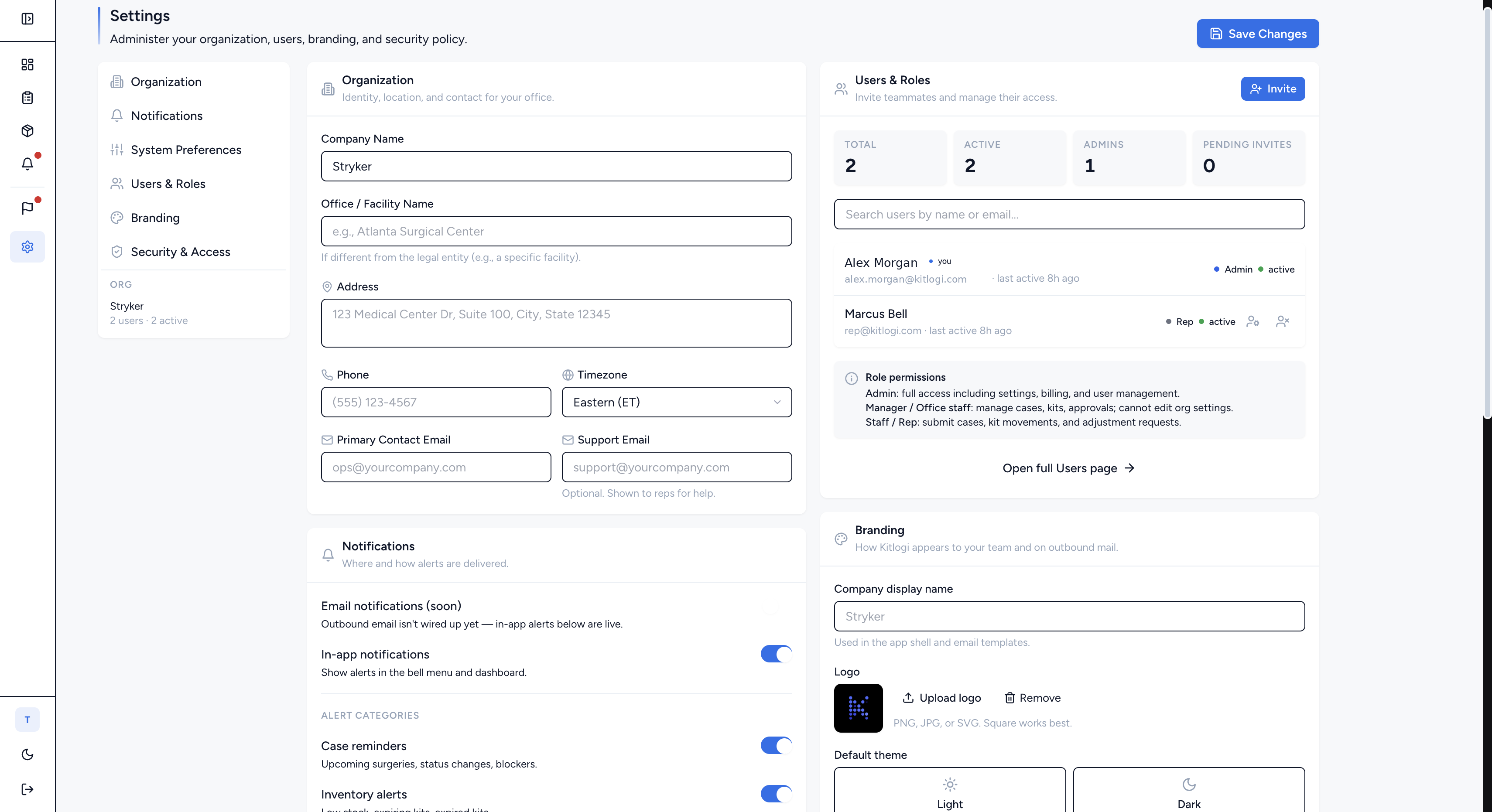
Settings page with users, roles, and permissions
Settings, roles & access

Your company’s data stays your company’s data

Set up your organization, invite your team, and control what each role can see and do. Reps see the cases assigned to them; office admins see the whole company; nobody sees another company’s data. Configure notification preferences, session timeout, and approval permissions to match how your office runs.

  • Role‑based access: admin, office, and rep permissions
  • Company‑scoped data isolation by design
  • Configurable session timeout and security settings
  • Approval permissions tuned to your workflow
The details that save cases

Small things that stop big mixups

Inventory snapshot

Total, available, in‑use, and missing kits in one card, with an expiring‑and‑expired list ranked by days left.

Expiry locks

Expired kits are blocked from being assigned to a case before they ever reach the OR.

One source of truth

A rep flag, an office note, and an approval all attach to the same case and kit, so nothing gets lost in translation.

Coverage & inventory exports

Pull a coverage PDF for tomorrow or an inventory PDF for the week straight from the dashboard.

See it on your own cases

Set up in about 15 minutes, import your kits, and watch tomorrow’s coverage fill in.